
Type 2 Error occurs when the Optovera system successfully measures the pupil but fails to identify the user via iris recognition. This error has a single cause: the worker did not open their eyes wide enough during the test.
In this situation:
-
The pupil reflex is measured, as the camera detects the pupil’s response to light.
-
But the biometric authentication fails, because the system cannot capture the full iris outline.
-
The test is stored as “pupil measured but user not identified.”
How to avoid Error Type 2
-
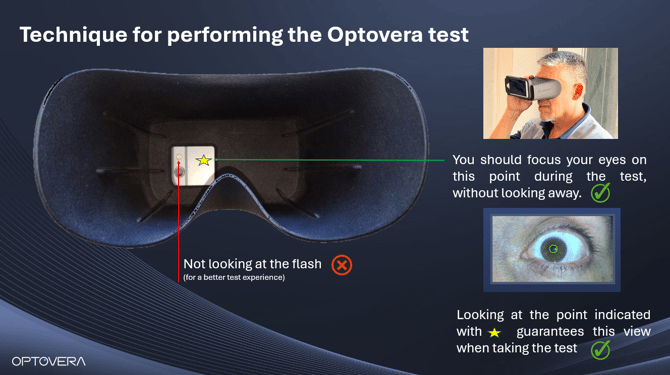
Instruct the worker to fully open their eyes before starting the test.
-
Remind them to keep their gaze forward and avoid blinking at the beginning.
-
Ensure the visor is properly placed without pressing the eyelids.
What to do if the error occurs
-
Ask the worker to open their eyes wider.
-
Repeat the test immediately, ensuring proper eyelid opening.
-
Confirm that the system recognizes the user before saving the result.
Conclusion
Error Type 2 is not caused by the system, but by insufficient eye opening during testing. In these cases, the pupil reaction is recorded, but the iris cannot be recognized, preventing user identification. With a simple instruction, the issue is immediately corrected.