The Dashboard module is the central screen of the Optovera platform. From here, supervisors and administrators get an overall view of test status and results, with visualization and data-download tools that support HSE management.
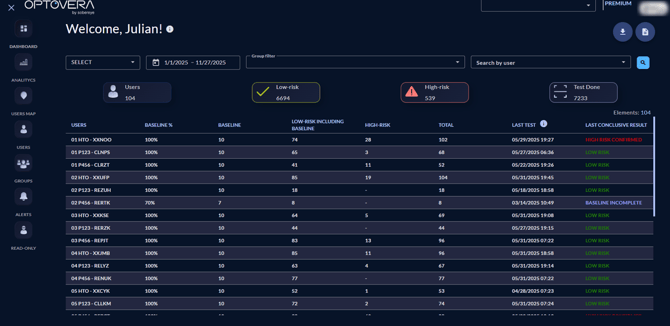
Main functions of the Dashboard module
This section lets you view executed tests in detail, filtered by the parameters you define.
Search parameters
-
Select a specific time period.
-
Select the customer’s pre-configured groups.
-
Select a particular user.
General summary
Once the parameters are defined and you press Search, the dashboard will display:
-
Total number of users who have taken tests.
-
Number of low-risk tests (including baseline tests).
-
Number of high-risk tests.
-
Total tests performed.
Per-user detail
-
A list of users with each one’s detail, based on the applied filters.
Data download
Dashboard data can be exported in .CSV format (Excel-compatible) using:
-
Download summary.
-
Download details.
Importance for HSE supervisors
-
It is the entry point to the system’s critical information.
-
It centralizes results and risk states for real-time decision-making.
-
It enables consolidation of information for audits, management reports, and internal communications.
Conclusion
The Dashboard module is the starting point of the Optovera platform. It offers HSE teams an integrated view of tests and results—with customizable filters, clear summaries, and data export—simplifying risk management in operations.