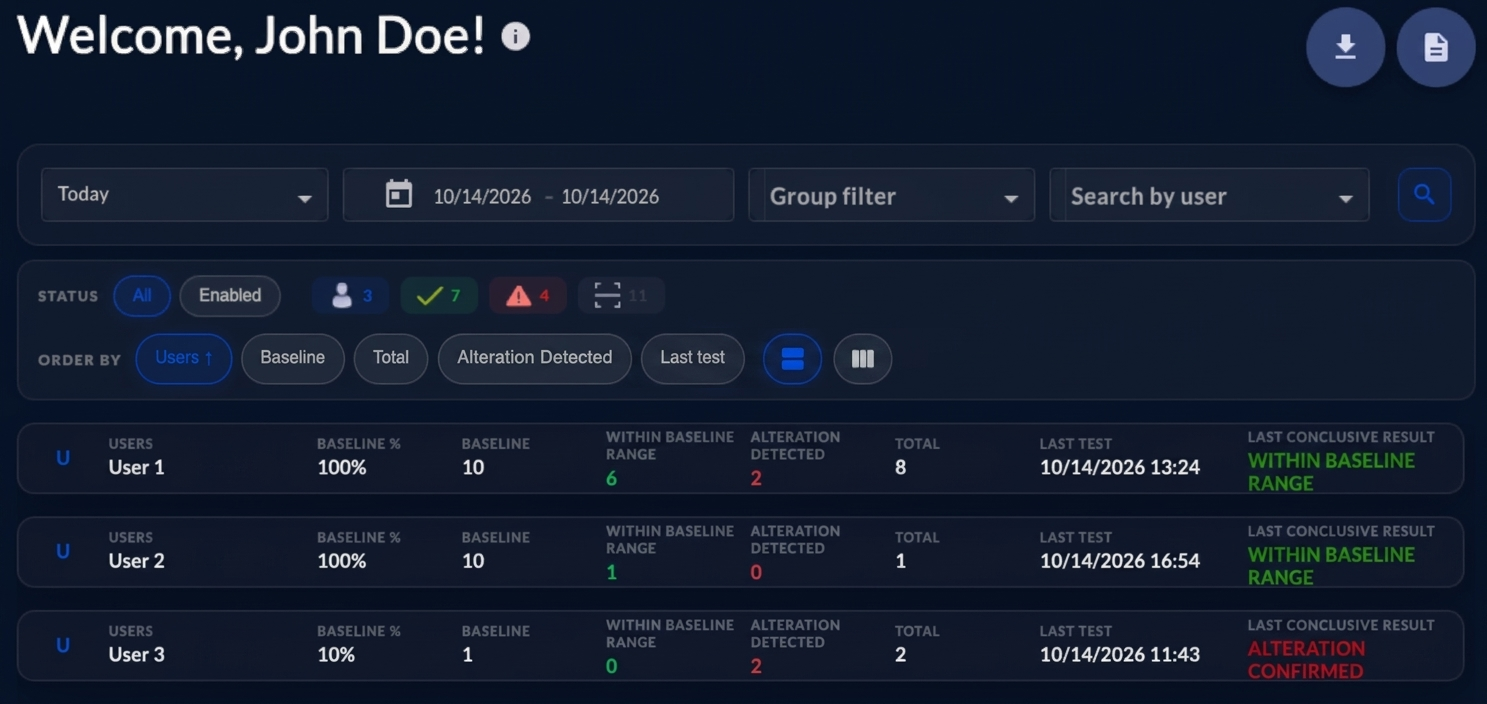
Administrators can review baseline progress in the OPTOVERA dashboard.
The dashboard includes User information such as baseline percentage, number of baseline measurements, result summaries, and last test information. These views help administrators understand whether each User is still in baseline acquisition or has completed it.
The dashboard reports also include baseline-related information, such as:
- Baseline Percent Complete, which shows the progress of baseline acquisition for each User.
- Baseline completion summaries, which help identify how many Users are at different stages of baseline acquisition.
Administrators can use these views to monitor whether Users are progressing toward baseline completion and to identify Users who may need additional support, training, or supervision during testing.
The dashboard also shows the association method each User uses, visible to the Administrator, Agent, and Read-Only roles, and whether a PIN reset is pending. The association method must not be treated as a factor in baseline review or in any assessment of the worker.
If many Users remain below the expected baseline completion level, administrators should check whether Users are testing regularly, whether the Devices are synchronized, whether Users appear correctly in USERS LIST, and whether Users are following the correct testing technique.